The group meets via Zoom on Mondays at 7:30pm at roughly two-week intervals. Group members will be informed of meetings by email so please contact the group leader if you wish to be included.
The computer group is open to any u3a member and caters for all levels of ability. It does not matter whether your computer uses Linux, Apple Mac OS X or Windows. The intention is to develop computer skills generally, without favouring any particular computer system. You can see a list of topics we have previously covered.
Any u3a member is welcome to contact the group leader for help with any IT issues.
Latest news from the group
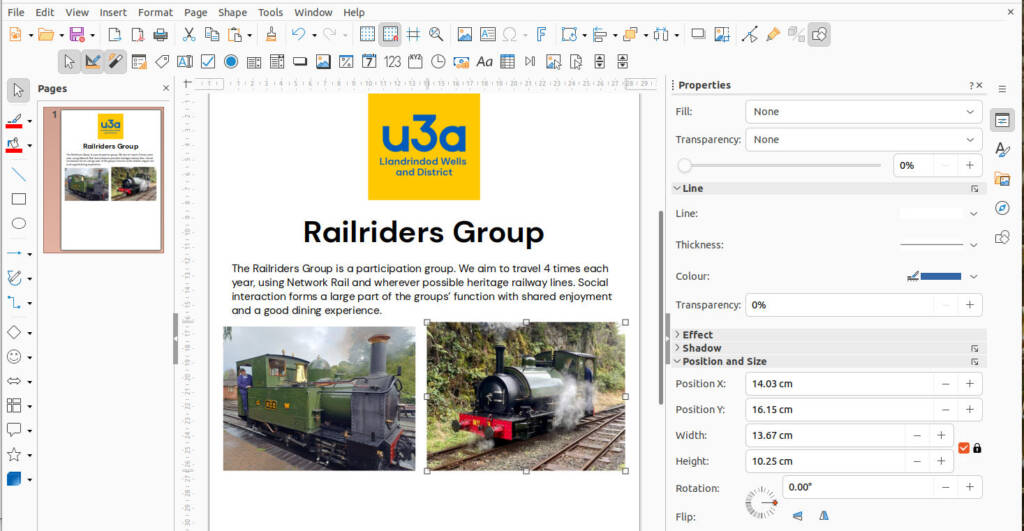
Starting March 16th – Using LibreOffice Draw to create posters, cards, diagrams, plans and more
Published 1st March 2026
Draw is a “vector” graphics program, which means that it stores drawing shapes as mathematical values. But you certainly don’t need to understand maths to use Draw! Vector graphics programs take a totally different approach to photo editing programs which store images as a grid of coloured dots. Both have their uses. Draw is part of the free, open source LibreOffice suite of programs and is available for computers running Linux, MacOS or Windows.
In these session we will start from the basics and go on to more sophisticated uses. No previous experience is necessary!
If you would like to join the group for this topic please contact the group leader. You do not need to have previously come to the computer group meetings. You are also welcome if you are a member of another u3a (in which case please say so when contacting the group leader).
Photo Editing and Digital Art using the GIMP Image Editor
Published 4th November 2025
Starting Monday 17th November. If you would like to join the group for this topic please contact the group leader.
The GNU Image Manipulation Program (GIMP) is a freely available and powerful raster graphics editor. It is used for photo retouching, image composition, image authoring, and creating digital art. It is available for Windows, Linux, and macOS and is widely used as a free alternative to commercial software like Photoshop.
Music on your computer
Published 19th October 2025
Starting 27th October the group will look at ways of working with music on a computer covering things like downloading music; transferring music from CDs; sound recording on your computer; editing music files; creating playlists for car music players; and anything else of interest.
If you wish to join the group for this topic please contact the group leader.